
WordPress announced late last week that they are now supporting SoundCloud (the music file sharing site that’s a bit like Flickr). What’s great about this latest development is that it makes it easy to add and play podcasts, music or other audio files on your site easily. I thought I’d test things out to see how it works.
Step one: Select a file you’d like to embed onto your site from SoundCloud (for testing purposes I browsed the tracks area of the site). Press ‘Share’ and a pop-up will appear with a selection of places to share your file. Select WordPress.

Step two: Either copy the embed code, or press on the “customise” link:
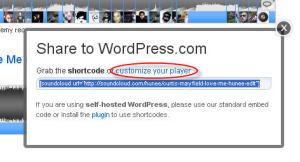
Step three: Customise the colour of your embedded file.

Step four: Finally copy and paste the special WordPress.com embed code if you have a hosted site (it uses square brackets) or the normal embed code if you self-host.
Simple.
Here’s the embed I made earlier, music from Curtis Mayfield. Enjoy!
 strategy | data | capability building
Responses
Excellent, well done. and thanks for posting how you did it
chris
Thanks Chris.
Excellent!
Great!! :) Thnks!